Drone simulator for pilots and training schools
AIRLAB FPV is a UAV simulation platform for drone pilots, training centres and professional operators. It lets you practise flight procedures, technical missions and operations with different aircraft, combining browser-based simulation, training tools and integration with ArduPilot SITL. VTOLs, aeroplanes and drones that fly like ArduPilot, work missions and Spanish regulations, with nothing to install. How the professional drone simulator works.

Pilots
Learn to fly your VTOL
Transitions, Q modes, failsafes and the real ArduPlane with your .param.
Learn more →
Operators and companies
Rehearse the job before you bill for it
Photogrammetry, thermal inspection and ENAIRE permissions before you fly.
Learn more →
Schools and instructors
Train your students
AI and remote instructor, logbook, certificates and A1/A3 and A2 preparation.
Learn more →How you train
UAV training with ArduPilot and SITL
Modes, transition and failsafes follow ArduPlane logic, and with AIRLAB Connector you fly the real ArduPilot (SITL) with your .param. ArduPilot SITL · VTOL simulator.
Learn to fly with an artificial intelligence instructor
Captain Pitot reviews every flight, gives you a score out of 100, shows you the correction and suggests what to train next. AI instructor.
Training in UAV procedures and regulations
Guided lessons, emergencies, ENAIRE UAS geographical zones and A1/A3 and A2 preparation with a mock exam. Drone pilot training.
Professional drone mission simulation
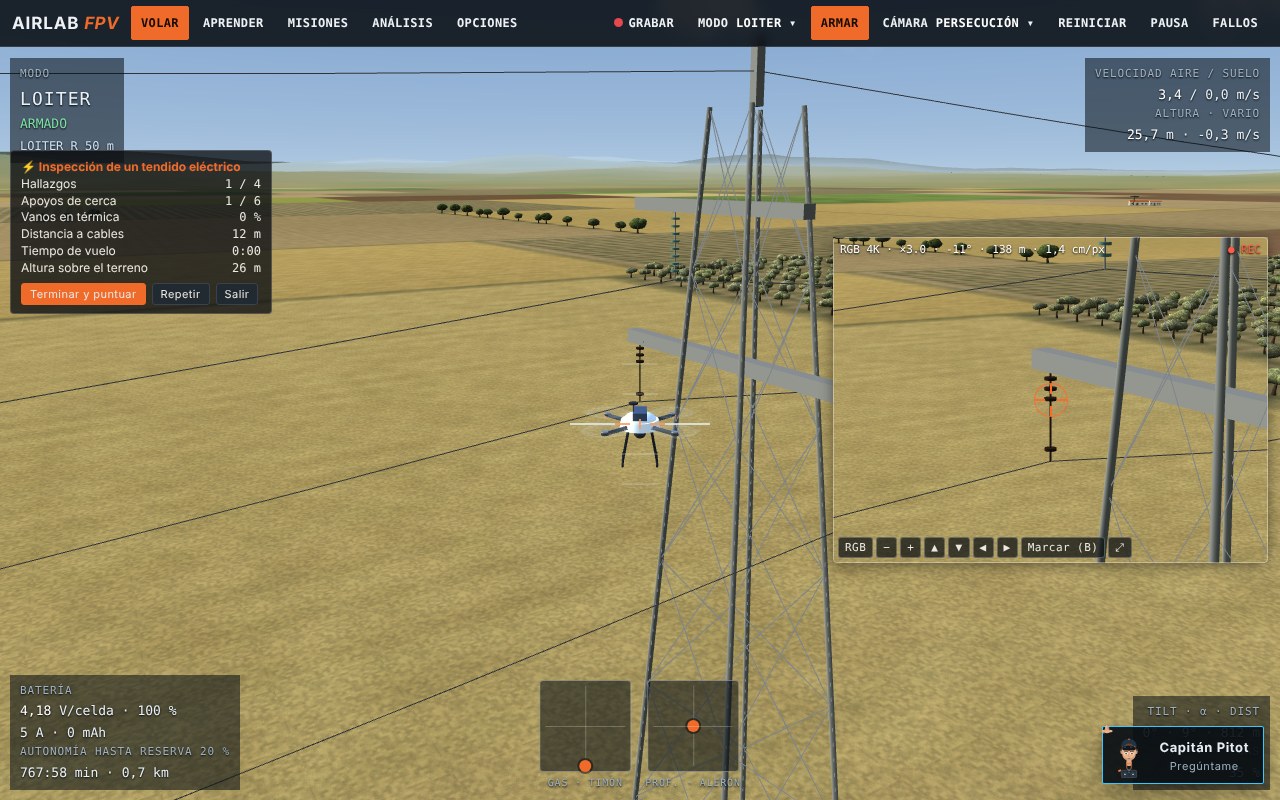
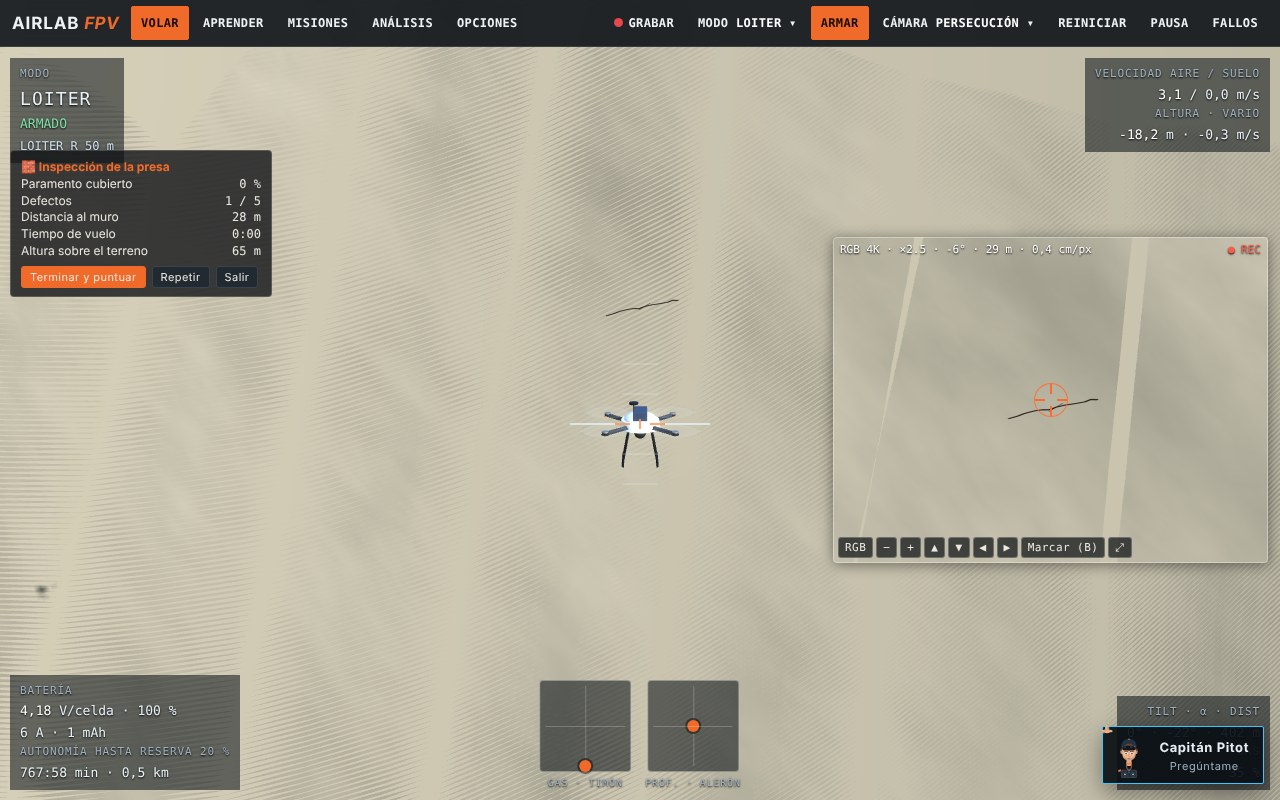
Twelve real-world jobs with a score out of 100 and a PDF report: inspection, cleaning, rescue and surveying with the aircraft and camera that would really be used. Professional drone simulator.



VTOL, fixed-wing and FPV aircraft simulation
19 aircraft, each with its aerodynamics calculated from its geometry and the default ArduPilot parameters. VTOL simulator with ArduPilot.


Free tool: ArduPilot .param analyzer. Upload the .param of your aeroplane, QuadPlane or multirotor and check failsafes, battery, calibrations, outputs and tilt against the official documentation in seconds.
Analyse my .paramLicences
- All 19 aircraft: VTOL, fixed wing, FPV and multirotors
- ArduPilot modes, lessons, challenges and scenarios
- Real ArduPilot (SITL) with your .param and AUTO missions
- Captain Pitot, AI instructor
- EASA/AESA regulations and logbook
- Everything in the Base
- 12 work missions with a score and PDF report
- Photogrammetry and remote sensing: GSD, overlaps, NDVI and thermal
- Operations centre with a drone-in-a-box
- Operation summary, ENAIRE UAS geographical zones and coordination
- Remote instructor and verifiable certificates
Want to try it first? 30 minutes of free flying with everything in the Pro, no card and no commitment.
Try 30 minutes freeRequest it with the form: I send you the invoice and, once I receive the bank transfer, I activate the licence on your account. With the Base you can upgrade to the Pro whenever you like by paying the difference (€800 + VAT). A school or several seats? Mention it in the request.
Request a licence
Tell me who you are and what you need. I reply with the invoice or with a proposal for your school or company and, if you like, I can show you the simulator on a video call.
Frequently asked questions about AIRLAB FPV
What is AIRLAB FPV?
A browser-based drone simulator for pilots, schools and professional operators: 19 aircraft (VTOL, fixed wing, FPV and multirotors) that fly with ArduPilot logic, 12 graded work missions, six scenarios with real terrain and an AI instructor, Captain Pitot.
Is it a professional UAV drone simulator?
It is designed for professional education and training: inspection, rescue and photogrammetry missions with a report, an operations centre with a drone-in-a-box, failures and weather on demand, a logbook and training certificates. It is a training tool, not an official qualification.
Can I train with ArduPilot?
Yes, in two ways. By default, the simulator reproduces the behaviour of ArduPlane (and of ArduCopter on the multirotors) in the browser, following its official documentation: modes, transition and failsafes. With AIRLAB Connector on a Mac you fly the real ArduPlane compiled as SITL, with your .param, and you can connect QGroundControl.
Can I practise VTOL flights?
Yes. There are five VTOLs (tilt-rotor, QuadPlane 4+1, flying wing and V-tail 4+1, and tailsitter) with the ArduPlane Q modes, vertical take-off and landing, and transition to forward flight.
Which professional missions are included?
Twelve: wind turbines and their cleaning with a tethered drone, a solar plant, a bridge, a dam, a power line, a telecommunications tower, the inside of a tank, an aircraft in a hangar without GPS, night-time rescue and smouldering embers, and stockpile volume measurement, plus the operations centre with a drone-in-a-box.
Does it run directly in the browser?
Yes. It opens from your account in a current browser with WebGL2, with nothing to install. You only need AIRLAB Connector on a Mac to fly with the real ArduPilot (SITL).
Do I need to install any software?
Not to use the simulator: it opens from your account in the browser. You only need to install AIRLAB Connector, on a Mac, if you want to fly with the real ArduPilot (SITL) or analyse the telemetry of your real aircraft. The radio connects over USB as a joystick, in Chrome or Edge.
What is the difference between the ArduPlane simulation and real SITL?
The ArduPlane simulation is a model of its behaviour written for the browser from the official documentation: it works on any computer with nothing to install. With SITL, the real ArduPlane firmware compiled for your computer is in charge: modes, PID, transition and failsafes come from your .param, and the simulator provides the physics, the 3D and the scenario. SITL needs a Mac with AIRLAB Connector and is available for the VTOL tilt-rotor and the twin-engine fixed wing.
Can it be used to train drone pilots?
Yes, as complementary training: guided lessons and progressive challenges, a remote instructor who injects failures and takes the controls, a logbook with simulator hours kept separate from real ones, verifiable training certificates and preparation for A1/A3 and A2 with a mock exam. It is not equivalent to an official rating or certificate from AESA (Spain's aviation safety agency).
What does the AI instructor include?
Captain Pitot gives you a debrief when you land, with a score out of 100 and how to correct each mistake; replays your flight and shows you the correction with an aircraft that flies with the simulator's physics; comments live; creates custom missions; suggests a training plan and answers questions about the simulator. The AI has a daily usage limit and, when offline, the rule-based debrief still works. It is a learning aid, not a replacement for an instructor.
How much does it cost and can I try it?
Base licence €1,200 + VAT and Pro licence €2,000 + VAT, as a one-off payment with no subscription. You can try it first for 30 minutes free with everything in the Pro.
Does it replace official pilot training?
No. It is complementary training: it prepares you for the flying, the procedures and the regulations, but official ratings and exams are the responsibility of AESA.
Why can't it be downloaded?
It opens from your account in the browser, so you always have the latest version and nobody can resell your copy. You can use it on any computer, but on only one at a time.
Which radio do I need?
Any EdgeTX or OpenTX radio that works as a USB joystick, in Chrome or Edge. You can also fly with the keyboard.
Does AIRLAB Connector touch my aircraft?
No. With the real aircraft it only listens to the telemetry from the ExpressLRS Backpack, and with SITL it only talks to the ArduPilot running on your computer. It sends nothing to the flight controller and does not change its parameters.
Does the AI cost extra?
No. The AI analysis, questions to Captain Pitot, live commentary, custom missions, the training plan and the remote sensing study are included, with a daily usage limit. If there is no connection or the limit is reached, the rule-based debrief still works.
Is it useful for learning photogrammetry?
It lets you practise the whole workflow: planning by GSD and overlap, flying the survey pattern, checking quality, calibrating, processing and reading indices and thermal imagery. The field data are simulated: it does not replace processing software or a real flight, but you arrive knowing what to do and what to look for.
Do I need FPV goggles?
No. You can fly on the computer screen, or watch the flight in 3D on your phone placed in a two-lens virtual reality headset (€15 to €35). The phone and the computer must be on the same wifi network, and it works in the web version.
What computer do I need?
A current browser with WebGL2 and an internet connection. If performance is tight, you can turn off the image effects or use the light scenario. For real ArduPilot and real flight with an instructor, a Mac with AIRLAB Connector; ArduPilot is compiled once with a script (20-40 minutes).